S9 Game Logo S9 Game
How to Deposit Money in S9 Game

How to Deposit Money in S9 Game

Complete guide to adding funds to your S9 Game account using JazzCash, Easypaisa, or Bank Transfer. Start playing real money games today!

Depositing Money in S9 Game

S9 Game provides a secure and straightforward deposit system that allows players to add funds to their gaming wallet quickly. Whether you want to play casino games, participate in tournaments, or try your luck at winning real cash prizes, depositing money is the first step to unlocking the full potential of the platform.

The platform supports multiple popular payment methods in Pakistan, making it convenient for all users to add funds according to their preferences. With instant processing for most transactions and robust security measures, you can deposit money with confidence knowing your financial information is protected.
Deposit Limits

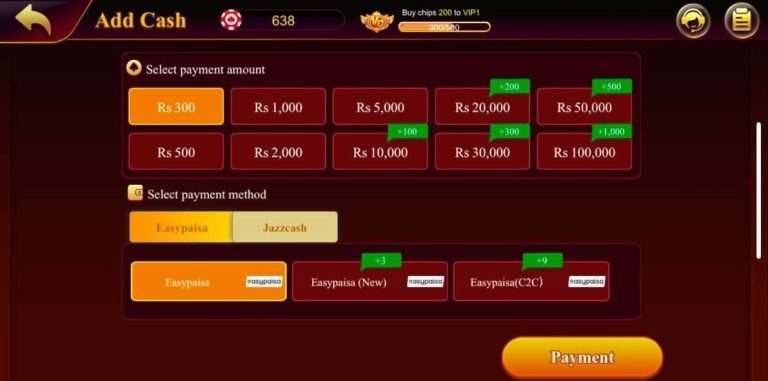
  • Minimum Deposit: 300 PKR
  • Maximum Deposit: 100,000 PKR per transaction
  • Processing Time: Instant for JazzCash and Easypaisa, up to 24 hours for Bank Transfer
  • Transaction Fees: No fees from S9 Game (payment providers may charge)
How to Deposit Money in S9 Game

Why Do You Need to Deposit Money?

Depositing money in your S9 Game account unlocks numerous benefits and opportunities:

Play Real Money Games

Many exciting games on S9 Game, including slot machines, Teen Patti, Rummy, and lucky spins, require real money to participate. Without depositing, you are limited to demo modes that don't offer cash prizes.

Win Real Cash Prizes

Only by playing with real money can you earn actual cash rewards. Depositing funds gives you the opportunity to turn your gaming skills into profit and withdraw your winnings directly to your account.

Unlock Deposit Bonuses

S9 Game offers attractive deposit-based bonuses including welcome bonuses for first-time depositors, reload offers, and daily rewards. These bonuses are only activated when you add funds to your account, giving you extra value and more chances to win.

Access Premium Features

Some game modes, special tournaments, and advanced features are only available to players with funded accounts. Depositing money allows you to enjoy the complete gaming experience with all features unlocked.

Make In-App Purchases

To buy coins, spins, or participate in special events, you need a balance in your game wallet. Depositing money ensures you never miss out on limited-time offers and exclusive opportunities.

Step-by-Step Deposit Guide

Follow these simple steps to add funds to your S9 Game account

  1. Login to Your Account: First, ensure you have downloaded and installed the S9 Game app on your Android device. Open the app and tap on the Login button at the top of the screen. Enter your registered mobile number or email address along with your password. If you haven't registered yet, visit our Registration Guide to create an account first.
  2. Navigate to Add Cash Section: Once logged in, look for the "Wallet" or "Add Cash" button in the main menu or top navigation bar. Tap on it to access the deposit section where you can add funds to your account.
  3. Enter Deposit Amount: In the deposit section, you will see a field to enter the amount you wish to deposit. The minimum amount is 300 PKR and the maximum is 100,000 PKR per transaction. Enter your desired amount within this range.
  4. Select Payment Method: S9 Game offers three payment methods: JazzCash, Easypaisa, and Bank Transfer. Choose the method that is most convenient for you. Each method has its own process, which we'll detail in the next section.
  5. Complete the Transaction: Follow the specific instructions for your chosen payment method (detailed below). Make sure to enter all required information accurately to avoid any transaction failures.
  6. Submit Transaction Details: After completing the payment through your chosen method, you will receive a transaction ID. Enter the last 4 digits of this transaction ID in the S9 Game app when prompted.
  7. Confirmation: Tap the "Submit" button and wait for confirmation. You should see a "Payment Successful" message on your screen. The deposited amount will be instantly reflected in your S9 Game wallet for JazzCash and Easypaisa, while bank transfers may take a few hours.
  8. Start Playing: Once your deposit is confirmed and the funds appear in your wallet, you can start playing your favorite games and enjoy the chance to win real money prizes!

Available Payment Methods

S9 Game supports three secure and convenient payment methods for deposits. Choose the one that best suits your needs:

1. JazzCash Deposit Method

JazzCash is one of the most popular mobile wallet services in Pakistan, offering instant deposits to your S9 Game account.

How to Deposit via JazzCash:

  1. In the deposit section of S9 Game, select "JazzCash" as your payment method
  2. Enter the amount you wish to deposit (minimum 300 PKR)
  3. You will see a JazzCash account number displayed on the screen
  4. Open your JazzCash app or dial the USSD code
  5. Transfer the exact amount to the provided JazzCash number
  6. Once the transfer is complete, you will receive a transaction ID
  7. Return to S9 Game and enter the last 4 digits of the transaction ID
  8. Click "Submit" to confirm the deposit
  9. Your account will be credited instantly

Processing Time: Instant
Transaction Fee: May vary based on JazzCash charges

2. Easypaisa Deposit Method

Easypaisa is another widely-used mobile payment service in Pakistan that offers seamless integration with S9 Game.

How to Deposit via Easypaisa:

  1. Navigate to the deposit section and select "Easypaisa"
  2. Enter the deposit amount you want to add to your wallet
  3. Note down the Easypaisa account number shown on the screen
  4. Open your Easypaisa mobile app or visit a nearby shop
  5. Send the exact amount to the provided account number
  6. You will receive a transaction ID after successful transfer
  7. Go back to the S9 Game app and enter the last 4 digits of your transaction ID
  8. Tap "Confirm" to complete the process
  9. Your funds will be available immediately in your S9 Game wallet

Processing Time: Instant
Transaction Fee: Check with Easypaisa for applicable charges

3. Bank Transfer Deposit Method

For larger deposits or if you prefer traditional banking, the bank transfer method is ideal and supports amounts up to 100,000 PKR.

How to Deposit via Bank Transfer:

  1. In the deposit section, choose "Bank Transfer" as your payment option
  2. You will see bank account details including bank name, account number, and account title
  3. Note down these details carefully
  4. Log into your mobile banking app or visit your bank branch
  5. Transfer the desired amount to the provided bank account
  6. Make sure to include your S9 Game username or ID in the transaction reference (if possible)
  7. Take a screenshot of the successful transaction or note the transaction ID
  8. Return to S9 Game and upload the screenshot or enter the transaction ID as proof
  9. Submit the deposit request
  10. Your account will be credited once the bank processes the transfer (usually within a few hours to 24 hours)

Processing Time: 2-24 hours depending on your bank
Transaction Fee: Banks may charge inter-bank transfer fees

Important Deposit Tips

Keep these tips in mind to ensure smooth and successful deposits:

  • Double-Check Information: Always verify that you've entered the correct payment details and amount before confirming any transaction.
  • Save Transaction IDs: Keep a record of all transaction IDs and receipts for your deposits. This helps resolve any issues quickly if they arise.
  • Use Your Own Account: For security purposes, always use payment methods registered in your own name. Deposits from third-party accounts may be rejected.
  • Stable Internet Connection: Ensure you have a stable internet connection while making deposits to avoid transaction failures or delays.
  • Check Account Limits: Be aware of your daily transaction limits on JazzCash, Easypaisa, or your bank account to avoid failed transactions.
  • Contact Support if Needed: If your deposit doesn't reflect within the expected time frame, contact S9 Game's 24/7 customer support with your transaction details.
  • Beware of Scams: Only deposit through the official S9 Game app. Never share your account details or passwords with anyone claiming to be from S9 Game.
  • Set a Budget: Decide on a gaming budget before depositing and stick to it. Only deposit amounts you can afford to use for entertainment.

Deposit FAQs

How long does it take for my deposit to reflect in my account?
JazzCash and Easypaisa deposits are processed instantly and your funds appear in your wallet within minutes. Bank transfers may take 2-24 hours depending on your bank's processing time. If your deposit hasn't appeared after the expected time, contact customer support.
Are there any fees for depositing money in S9 Game?
S9 Game does not charge any fees for deposits. However, your payment provider (JazzCash, Easypaisa, or bank) may apply their own transaction charges. Check with your payment provider for details on applicable fees.
What is the minimum and maximum deposit amount?
The minimum deposit amount is 300 PKR, and the maximum is 100,000 PKR per transaction. If you need to deposit more, you can make multiple transactions or contact customer support for assistance.
Can I deposit using someone else's payment account?
For security purposes, it's recommended to use only payment accounts registered in your own name. Deposits from third-party accounts may be flagged for verification or rejected to prevent fraud and ensure account security.
Do deposit bonuses expire?
Yes, some deposit bonuses come with expiration times and usage conditions. Always read the bonus terms and conditions in the app to understand the validity period and wagering requirements before the bonus expires.
What should I do if my deposit failed?
If your deposit fails, first check if the amount was deducted from your payment account. If deducted but not credited to S9 Game, contact customer support with your transaction ID and screenshot. If not deducted, check your payment account balance and transaction limits, then try again.
Can I get a refund of my deposit?
Generally, deposits cannot be refunded once successfully credited to your account. However, if there was a technical error or duplicate transaction, contact customer support immediately with your transaction details for assistance.
Is it safe to deposit money in S9 Game?
Yes, S9 Game uses secure payment gateways and encryption to protect your financial information. All transactions are processed through trusted payment providers. However, always ensure you're using the official S9 Game app and never share your account credentials.